 Bytetally
MenuMeters alternative: the same glance, built for modern macOS
Last updated: 21 July 2026
MenuMeters is a genuine classic: tiny open-source meters in the menu bar for network throughput, CPU and disk, from an earlier era of macOS. If you're searching for a MenuMeters alternative, you probably want two things — that same at-a-glance ↑↓ readout on a current version of macOS, and ideally something the original never attempted: knowing which app is behind the numbers, keeping a record of it, and being able to do something about it.
The short answer: Bytetally puts a live upload/download readout in the menu bar of macOS 14+, and behind that glance it tracks every app's traffic separately, keeps history, sets data caps with alerts, and can throttle or block any app. It's a sandboxed Mac App Store app, and all analysis stays on your Mac.
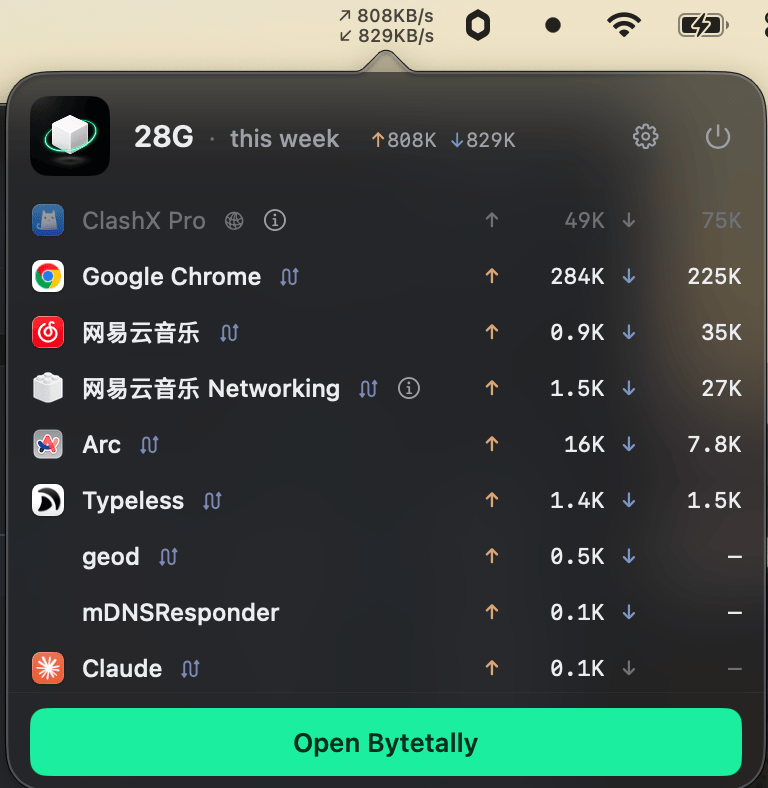
The familiar glance — live ↑↓ speed — with a popover that names the apps behind it.
Bytetally vs MenuMeters at a glance
| Capability | Bytetally | MenuMeters |
|---|---|---|
| Live throughput in the menu bar | ✓ ↑↓ rates, switchable to today's usage or cap % | ✓ Its classic feature |
| Built for current macOS | ✓ macOS 14+, Apple silicon + Intel, Mac App Store | A classic from an earlier era of macOS |
| Which app is using the bandwidth | ✓ Per-app live rate + totals, up/down separated | — Instantaneous rates only |
| Usage history | ✓ 7-day trend free; any date range + heatmap with Pro | — |
| Data caps with alerts | ✓ Monthly / weekly / daily, 80%·100%·custom thresholds | — |
| Per-Wi-Fi budgets | ✓ Independent cap per network | — |
| Unusual-upload alerts | ✓ Notifies when an app's upload surges | — |
| Throttle or block an app | ✓ Speed limits, one-click disconnect, auto-response | — |
| VPN / proxy attribution | ✓ Traces traffic back to the real app | — |
| Export | ✓ CSV / JSON | — |
| CPU / disk meters | — | ✓ |
| Privacy | On-device, sandboxed, no account | Local tool |
From a meter to an answer
MenuMeters answered one question brilliantly: is data moving right now, and how fast? For years that was enough. But the questions people actually bring to the menu bar today are one step further along: which app is pushing 4 MB/s up while I'm on a hotspot? How much has this Mac used since Monday? Am I going to blow through my plan before the month ends?
Bytetally keeps the glance and adds the answers. Its measurement runs through a macOS Network Extension, so every byte is attributed to the app that caused it — including traffic that flows through a VPN or local proxy like ClashX, which gets traced back to the real originating app. Command-line tools are merged into their host app, so the list stays readable. From there:
- Glance. Live ↑↓ speed in the menu bar, exactly where MenuMeters put it. Click for a popover ranking apps by usage this period; open the Live view for a rolling 10-minute curve when something feels off.
- Remember. Totals for the current period and a 7-day trend are free. Pro keeps history for any date range with an hour-by-day heatmap, and exports CSV/JSON if you want the raw numbers.
- Control. Set monthly, weekly or daily caps — with an independent budget per Wi-Fi network — and get notified at 80%, 100% or your own threshold. Right-click any app to Disconnect, Limit speed or Set quota; when a cap runs out, the auto-response blocks or throttles for you.
Traffic between devices on your local network doesn't count against your budget, light and dark mode are both native, and the app ships in 10 languages.
When MenuMeters is the better choice: if all you want is a free, minimal, instantaneous meter — network plus CPU and disk — and it runs happily on your system, MenuMeters still does that with charming economy. Bytetally doesn't do CPU or disk meters at all.
Bytetally is for when the meter stops being enough: when you need per-app accounting, history, budgets and control on a current version of macOS.
Switching from MenuMeters: a 5-minute setup
- Install Bytetally from the Mac App Store and approve the Network Extension when macOS asks — it's fully sandboxed and App Store reviewed.
- The ↑↓ readout appears in your menu bar immediately; pick the display you like (live speed now, or today's usage / cap percentage with Pro).
- After a day of normal use, open the popover or the Overview — your top apps by traffic are ranked and named, no guessing from process IDs.
- If you're on a metered plan or hotspot, set a data cap and let the threshold alerts watch it for you.
Frequently asked questions
Does Bytetally work on current versions of macOS?
Yes. Bytetally is built for macOS 14 Sonoma and later, runs natively on both Apple silicon and Intel Macs, and is distributed through the Mac App Store, fully sandboxed and App Store reviewed.
Can Bytetally show upload and download speed in the menu bar like MenuMeters?
Yes. A live ↑↓ readout sits in the menu bar, and clicking it opens a popover with this period's usage per app. With Pro you can switch the display to today's total usage or your data-cap percentage.
Does Bytetally tell me which app is using the bandwidth, not just how much?
Yes — that's the core of it. Every app's upload and download are tracked separately, with live rates and period totals. Even traffic through a VPN or local proxy is traced back to the app that caused it, and command-line tools are merged into their host app.
Is my traffic data uploaded anywhere?
No. All analysis happens on-device. There is no account, and the only network request the app makes is purchase-receipt validation.
Is Bytetally free?
Core monitoring is free. Pro features such as data caps, per-app control and full history come with a free trial, then a subscription or a one-time lifetime purchase.
Related pages
The glance you're used to, with the answers you were missing
Per-app tracking free forever. Caps, throttling and full history with a free trial.
Download Free on the Mac App StoremacOS 14 Sonoma or later · 100% on-device · No account