 Bytetally
Little Snitch alternative — when the question is how much, not who
Last updated: 21 July 2026
Little Snitch is a connection-level firewall: it watches every outbound connection your Mac makes and lets you write per-domain, per-server rules about who may talk to whom. At that job it is unmatched, and this page won't pretend otherwise. But a lot of people typing "little snitch alternative" are actually asking a different question: how much data is each app using? Which app ate my hotspot allowance? What uploaded 3 GB overnight? Am I going to blow through my monthly cap? That is usage accounting, not connection rules — and it's the question Bytetally was built to answer.
The short answer: if you need per-domain firewall rules, stay with Little Snitch. If you need to know how much data every app uploads and downloads — with budgets, per-Wi-Fi caps, threshold alerts, throttling and long-term history — Bytetally is the Mac app for that job. All analysis stays on your device.
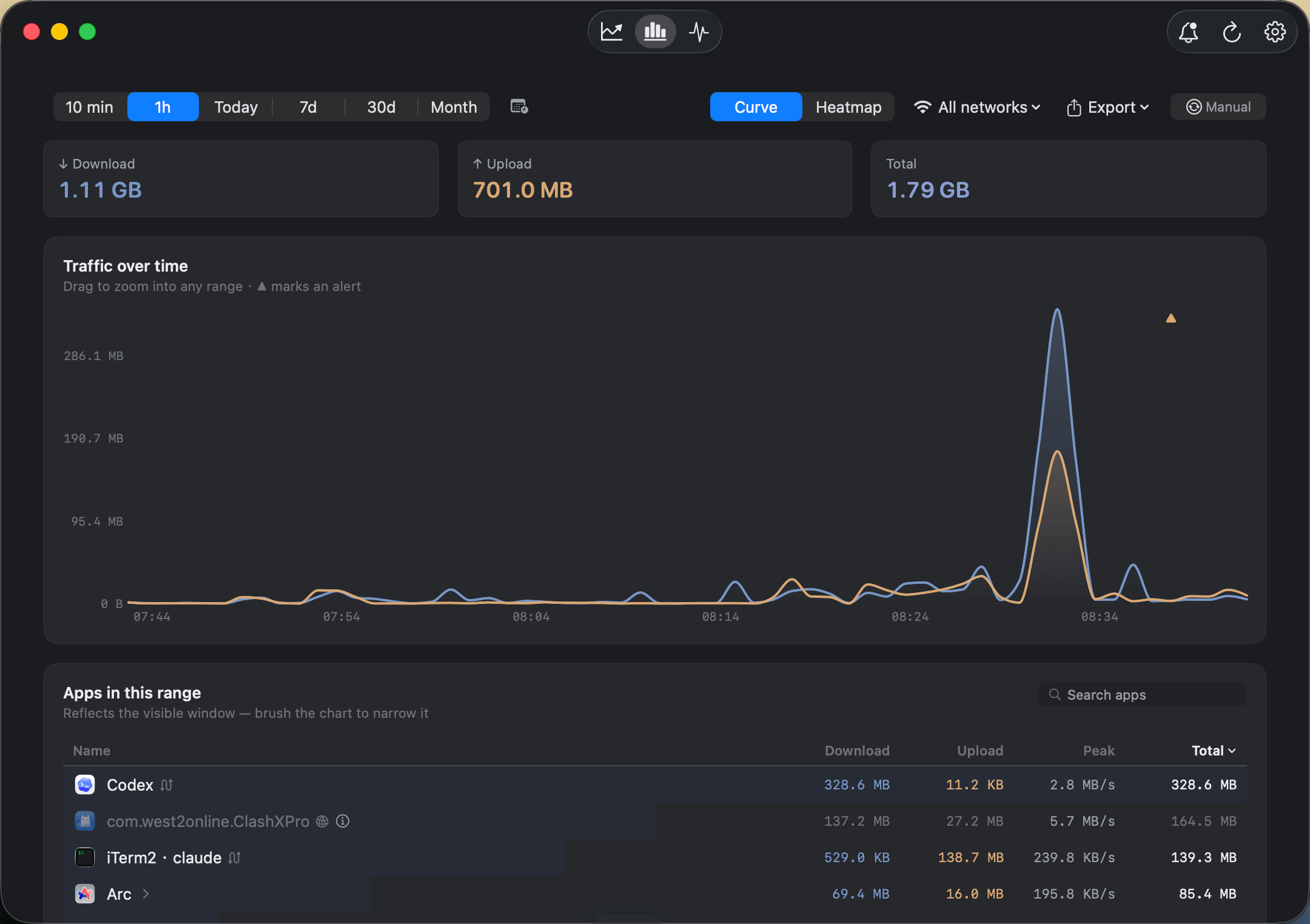
Not "which servers?" but "how much, by which app, and when" — per-app upload and download over time.
Two tools, two different questions
| Capability | Bytetally | Little Snitch |
|---|---|---|
| Core question | "How much data does each app use?" | "Which connections may an app make?" |
| Per-domain / per-server rules | — | ✓ Its specialty, and it's excellent at it |
| Alert style | ✓ Volume-based: cap thresholds, unusual-upload spikes | Connection-based alerts and rules |
| Per-app usage totals, upload/download separated | ✓ Live rate + period totals | — |
| Long-term history & heatmap | ✓ Any date range, hour-by-day | — |
| Data caps with alerts | ✓ Monthly / weekly / daily, 80%·100%·custom | — |
| Per-Wi-Fi budgets | ✓ Independent cap per network | — |
| Throttle an app (keep it alive, slower) | ✓ Upload/download speed limits | — |
| Block an app | ✓ One click, per app | ✓ Via connection rules |
| Auto-response when a cap runs out | ✓ Auto-block or auto-throttle | — |
| Privacy | On-device, sandboxed, no account | Local tool |
What the usage view gives you
Bytetally's free tier already answers the everyday questions. Every app's upload and download are tracked separately — live rate plus a running total for the period. The Overview shows this period's usage, a 7-day trend and the top apps by traffic; the Live view plots the last 10 minutes when you want to catch something in the act; and the menu bar keeps ↑↓ speed always visible, with a popover ranking apps by usage.
The accounting is honest about the hard cases, too: traffic that flows through a VPN or a local proxy (like ClashX) is traced back to the app that actually caused it, command-line tools are grouped under their host app, common system processes come with plain-language explanations, and traffic between devices on your local network doesn't count against your internet usage.
Pro extends the record backwards and outwards: history for any date range, an hour-by-day heatmap that makes nightly backups and weekday patterns jump out, per-Wi-Fi filtering to compare networks, and CSV/JSON export at minute, hour, day or month granularity.
From watching to acting
Where Little Snitch acts on connections, Bytetally acts on volume. Set a monthly, weekly or daily cap — plus an independent budget for each Wi-Fi network, so a hotspot or hotel connection gets a strict allowance — and get notified at 80%, 100% or any custom threshold. Turn on unusual-upload alerts and Bytetally proactively tells you when an app's uploads suddenly surge. When an app misbehaves, right-click it: Disconnect cuts it off, Limit speed throttles its upload or download smoothly, Set quota gives it a personal budget. And the overage auto-response closes the loop: when a cap runs out, Bytetally blocks or throttles automatically, even if you're not at the Mac.
When Little Snitch is the better choice: if your question is "which servers may this app contact?" — silencing telemetry, auditing outbound connections, writing precise per-domain allow/deny rules — Little Snitch is the reference on the Mac, its rule engine is unmatched at that job, and its reputation is thoroughly earned. Bytetally does not do per-domain rules.
If your question is "how much data, by which app, on which network, and what do I do about it?" — that's the job Bytetally was built for.
Getting started: 5 minutes
- Install Bytetally from the Mac App Store and approve the Network Extension when macOS asks — the app is fully sandboxed and App Store reviewed.
- Let it run for a day, then open the Overview: the top apps by traffic usually explain any mystery usage immediately.
- Set a data cap for your billing period, and give any metered Wi-Fi (hotspot, hotel) its own budget.
- Leave unusual-upload alerts on — the "what uploaded 3 GB overnight?" question then answers itself.
Frequently asked questions
Does Bytetally replace Little Snitch's per-domain rules?
No, and it doesn't try to. Little Snitch decides which connections an app may make, domain by domain. Bytetally measures how much data each app transfers and lets you budget, throttle or block per app. They answer different questions.
Can Bytetally show how much data each app has used?
Yes. Every app's upload and download are tracked separately — live rate plus totals for the period — and Pro adds history for any date range, an hour-by-day heatmap, per-Wi-Fi filtering and CSV/JSON export.
Can Bytetally block an app from the internet?
Yes. Any app can be disconnected with one click — or throttled instead, so a sync keeps running slowly. Once a data cap runs out, Bytetally can block or throttle automatically.
Is my traffic data uploaded anywhere?
No. All analysis happens on-device. There is no account, and the only network request the app makes is purchase-receipt validation.
Is Bytetally free?
Core monitoring is free. Pro features such as data caps, per-app control and full history come with a free trial, then a subscription or a one-time lifetime purchase.
Related pages
Know how much — then decide what to do about it
Per-app tracking free forever. Caps, budgets, throttling and history with a free trial.
Download Free on the Mac App StoremacOS 14 Sonoma or later · 100% on-device · No account