 Bytetally
iStat Menus alternative for network monitoring: depth over breadth
Last updated: 21 July 2026
iStat Menus is one of the most polished utilities on the Mac: CPU, GPU, sensors and network charts, all living in the menu bar. As a whole-system dashboard it is genuinely hard to fault, and this page won't pretend otherwise. But plenty of people install it for one reason only — the network readout — and then discover that a dashboard is the wrong shape of tool when the real problem is data usage: which app is eating the cap, how much it used this week, and what to do about it.
The short answer: Bytetally is a network monitor for macOS that goes deep on one dimension instead of broad on every dimension. It tracks every app's upload and download over time, keeps history you can query for any date range, sets monthly/weekly/daily data caps with 80%/100%/custom alerts, warns on unusual uploads, and can throttle or block any app. All analysis stays on your Mac.
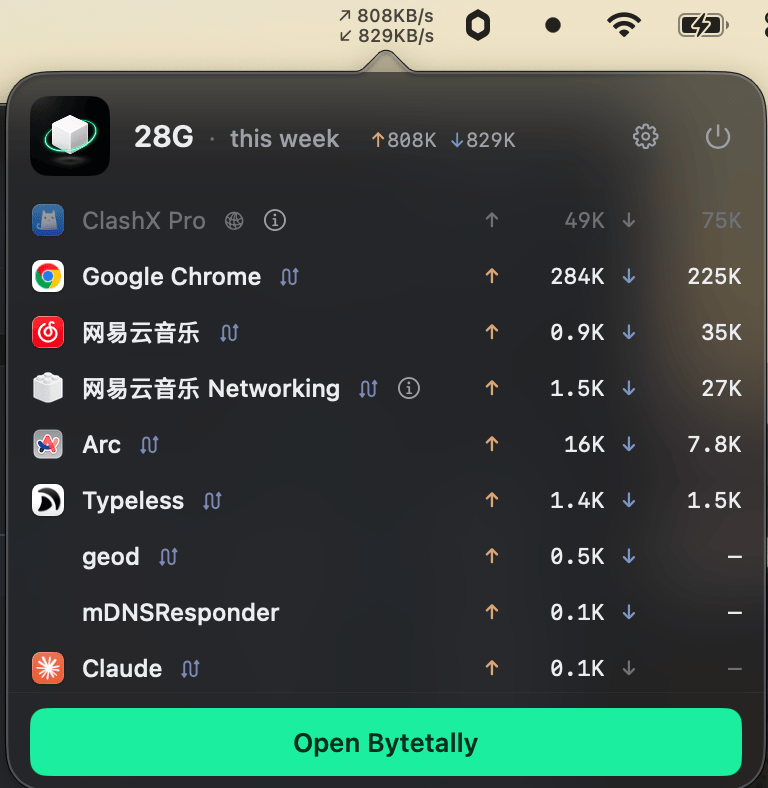
The menu bar shows live ↑↓ speed; the popover ranks every app by what it actually used this week.
Bytetally vs iStat Menus at a glance
| Capability | Bytetally | iStat Menus |
|---|---|---|
| Core focus | Per-app network accounting and control | Whole-system dashboard: CPU, GPU, sensors, network charts |
| CPU / GPU / temperature monitoring | — Deliberately out of scope | ✓ Its home turf |
| Menu bar network readout | ✓ Live ↑↓ speed, or today's usage / cap percentage | ✓ Network charts |
| Per-app data accounting over time | ✓ Upload and download separated, live rate + period totals | — |
| Long-term history (any date range) | ✓ Plus an hour-by-day heatmap | — |
| Data caps with alerts | ✓ Monthly / weekly / daily, 80%·100%·custom thresholds | — |
| Independent cap per Wi-Fi network | ✓ Hotspot strict, home unlimited | — |
| Unusual-upload alerts | ✓ | — |
| Throttle or block an app | ✓ One-click disconnect, smooth speed limits | — |
| VPN / proxy attribution | ✓ Traces traffic back to the real app | — |
| CSV / JSON export | ✓ | — |
A dashboard answers "how is it doing" — accounting answers "which app, and why"
iStat Menus excels at the instantaneous: how loaded is the CPU, how warm is the machine, how fast is the network moving right now. Those are dashboard questions, and a dashboard is the right answer to them.
Data usage is a different kind of question. It involves time ("what used 30 GB this billing period?"), budgets ("keep the hotspot under 10 GB a week") and action ("slow that backup down, cut that app off"). Bytetally is built around exactly that ledger. Because it measures through a macOS Network Extension — App Store reviewed and fully sandboxed — it also traces traffic that flows through VPNs or local proxies back to the app that caused it, merges command-line tools into their host app, and leaves traffic between devices on your own network out of your internet totals.
- Watch. The menu bar shows live ↑↓ speed and the popover ranks apps by usage this period. With Pro, the menu bar itself can display today's usage or the percentage of your cap already spent.
- Understand. The overview shows this period's usage, a 7-day trend and your top apps; Pro history covers any date range with an hour-by-day heatmap. Built-in notes explain common system processes — and whether it's safe to throttle or block them.
- Act. Set caps per period and per Wi-Fi network with 80%/100%/custom alerts, get warned when an app's upload suddenly surges, then Disconnect, Limit speed or Set quota per app — or let the overage auto-response block or throttle for you when a cap runs out.
When iStat Menus is the better choice: if you care about CPU load, GPU activity, temperatures and fans as much as the network, iStat Menus' whole-system dashboard is exactly the right tool, and Bytetally makes no attempt to replace it.
The two also measure different things, so they are not mutually exclusive: some people keep iStat Menus for system vitals and add Bytetally for the data ledger, budgets and per-app control.
Switching your network monitoring over: a 5-minute setup
- Install Bytetally from the Mac App Store and approve the Network Extension when macOS asks — it is fully sandboxed and App Store reviewed.
- Let it run for a day, then open the overview: this period's usage, the 7-day trend and the top apps by traffic tell you immediately where the data goes.
- Set a monthly or weekly cap under Network & Quota, and give metered networks such as a phone hotspot their own independent budget.
- Pick your menu bar display — live speed, today's usage or cap percentage — and act on the offenders: throttle, block, or set a per-app quota.
Frequently asked questions
Does Bytetally show CPU, GPU or temperature stats like iStat Menus?
No, and deliberately so. Bytetally covers one dimension in depth: network usage. It tracks every app's upload and download over time, keeps history, and adds data caps, alerts, throttling and blocking — jobs a system dashboard is not designed to do.
Can I run Bytetally alongside iStat Menus?
Yes. The two answer different questions. Bytetally measures traffic through a macOS Network Extension and does not read system sensors, so many people keep iStat Menus for system vitals and add Bytetally for data accounting and control.
What can the Bytetally menu bar item show?
By default it shows live upload and download speed, and the popover ranks apps by usage this period. With Pro you can switch the menu bar display to today's usage or the percentage of your data cap that is already used.
Is my traffic data uploaded anywhere?
No. All analysis happens on-device. There is no account, and the only network request the app makes is purchase-receipt validation.
Is Bytetally free?
Core monitoring is free. Pro features such as data caps, per-app control and full history come with a free trial, then a subscription or a one-time lifetime purchase.
Related pages
Keep the dashboard — get real answers about your data
Per-app tracking free forever. Caps, history and control with a free trial.
Download Free on the Mac App StoremacOS 14 Sonoma or later · 100% on-device · No account