 Bytetally
GlassWire for Mac: the closest macOS equivalent
Last updated: 21 July 2026
Let's answer the question in the search box first: there is no GlassWire for macOS. GlassWire is a network monitor and firewall for Windows and Android, and the company does not offer a Mac version. If you have switched to a Mac — or added one next to your PC — and you miss GlassWire's per-app usage graphs, its alerts and its firewall-style blocking, this page maps each of those habits to Bytetally, a network monitor built natively for macOS.
The short answer: Bytetally is a native Mac app that covers the ground GlassWire covers on Windows. It tracks every app's upload and download with live graphs and long-term history, notifies you at data-cap thresholds or when an app's uploads suddenly spike, and can block or throttle any app. All analysis stays on your Mac.
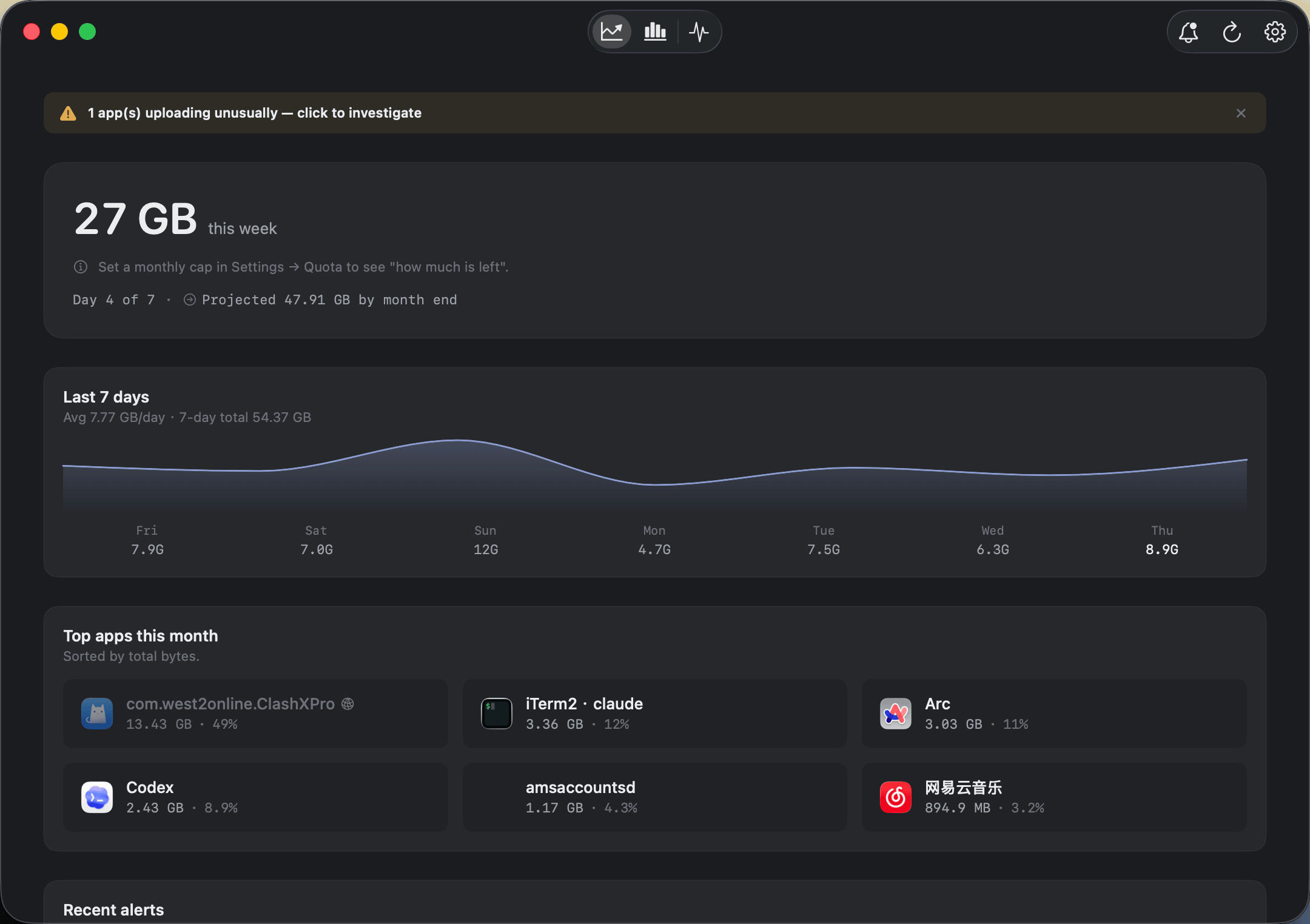
The Overview: this period's usage, a 7-day trend and the apps responsible — the picture GlassWire users expect, on a Mac.
Bytetally vs GlassWire at a glance
| Capability | Bytetally | GlassWire |
|---|---|---|
| Runs on macOS | ✓ Native, Mac App Store, sandboxed | ✗ Windows/Android only |
| Per-app usage graphs | ✓ Live rates, 7-day trend, hour-by-day heatmap | Windows/Android only |
| Upload / download separated | ✓ Per app, live and per period | Windows/Android only |
| Long-term history | ✓ Any date range | Windows/Android only |
| Data caps with alerts | ✓ Monthly / weekly / daily, 80%·100%·custom thresholds | Windows/Android only |
| Unusual-upload alerts | ✓ Notifies when an app's uploads spike | Windows/Android only |
| Block an app | ✓ One click | Windows/Android only |
| Throttle an app (keep it alive, slower) | ✓ Upload/download speed limits | Windows/Android only |
| Per-Wi-Fi data budgets | ✓ Independent cap per network | Windows/Android only |
| VPN / proxy attribution | ✓ Traces traffic back to the real app | Windows/Android only |
| Export | ✓ CSV / JSON | Windows/Android only |
| Privacy | On-device, sandboxed, no account | Windows/Android only |
Mapping your GlassWire habits to a Mac
The usage graph
GlassWire's graphical usage curves are its signature, and any replacement has to get this right. Bytetally gives you the same picture in three layers: the Overview shows this period's total, a 7-day trend and the top apps by traffic; the Live view shows a rolling curve of the last 10 minutes when you want to watch something happen in real time; and the Pro heatmap lays usage out hour-by-day so you can spot the nightly backup or the Tuesday video-call spike at a glance. Upload and download are tracked separately for every app — both the live rate and the running total for the period.
The alerts
GlassWire users rely on being told when something changes, not on staring at charts. Bytetally handles this in two ways. First, data caps: set a monthly, weekly or daily budget — globally, or independently per Wi-Fi network — and get notified at 80%, 100% or any custom threshold. Second, unusual-upload alerts: if an app's upload volume suddenly surges, Bytetally proactively notifies you, so a runaway sync or an app quietly pushing data doesn't go unnoticed.
The firewall-style block
On Windows, GlassWire pairs monitoring with a firewall. On the Mac, Bytetally gives you per-app enforcement through a macOS Network Extension (App Store reviewed): Disconnect cuts an app off with one click, Limit speed throttles its upload or download instead of killing it, and Set quota gives the app its own budget. When a cap runs out, the overage auto-response can block or throttle automatically — even while you're away from the keyboard.
The details Windows tools can't see on a Mac
Because Bytetally is built on macOS's own Network Extension framework, it handles Mac-specific cases properly: traffic that flows through a VPN or a local proxy (like ClashX) is traced back to the app that actually caused it, command-line tools are grouped under their host app, common system processes come with plain-language explanations and advice on whether they are safe to throttle or block, and traffic between devices on your local network is excluded from your internet usage totals.
If you're staying on Windows: GlassWire remains a good choice there — its graphical usage view is excellent, and nothing on this page argues you should replace it on a PC. This page is for the Mac on your desk, where GlassWire simply doesn't run.
On macOS, Bytetally is the tool built for that same job: see what every app consumes, get alerted when something misbehaves, and act on it.
Getting set up on the Mac: 5 minutes
- Install Bytetally from the Mac App Store and approve the Network Extension when macOS asks — the app is fully sandboxed and App Store reviewed.
- Let it run for a day. The menu bar shows live ↑↓ speed; the Overview fills in with per-app totals and the 7-day trend.
- Recreate your GlassWire alerts: set a data cap for the period (and a separate one for any metered Wi-Fi), and leave unusual-upload alerts on.
- When an app misbehaves, right-click it: Disconnect, Limit speed or Set quota.
Frequently asked questions
Is there a GlassWire version for macOS?
No. GlassWire is available for Windows and Android only. On a Mac you need a tool built for macOS — Bytetally covers the same job natively: per-app usage tracking with graphs, alerts, and the ability to block or throttle apps.
Does Bytetally show usage graphs like GlassWire?
Yes. The Overview shows this period's usage, a 7-day trend and top apps; the Live view shows a rolling curve of the last 10 minutes; and Pro adds an hour-by-day heatmap plus history for any date range.
Can Bytetally block apps the way GlassWire's firewall does?
Bytetally can disconnect any app from the internet with one click. It can also throttle an app's upload or download speed instead of blocking it, and automatically block or slow apps once a data cap is used up.
Is my traffic data uploaded anywhere?
No. All analysis happens on-device. There is no account, and the only network request the app makes is purchase-receipt validation.
Is Bytetally free?
Core monitoring is free. Pro features such as data caps, per-app control and full history come with a free trial, then a subscription or a one-time lifetime purchase.
Related pages
The GlassWire habit, native on your Mac
Per-app tracking free forever. Caps, alerts, throttling and blocking with a free trial.
Download Free on the Mac App StoremacOS 14 Sonoma or later · 100% on-device · No account