 Bytetally
Bandwidth+ alternative: keep the totals, add the "which app" layer
Last updated: 21 July 2026
Bandwidth+ does a simple job well: it sits in the menu bar, stays extremely light, and counts how much data you use on each network you join. For a lot of people that per-network tally is all they ever wanted. But a total is only half an answer. When the counter jumps by 4 GB on hotel Wi-Fi, the question that actually matters is which app did it — and a network-level counter, by design, cannot say.
The short answer: Bytetally keeps the per-network accounting — you can filter usage by Wi-Fi network and give each one its own data cap — and adds the layer underneath: every app's upload and download over time, caps with 80%/100%/custom alerts, unusual-upload warnings, one-click block, per-app speed limits, and CSV/JSON export. All analysis stays on your Mac.
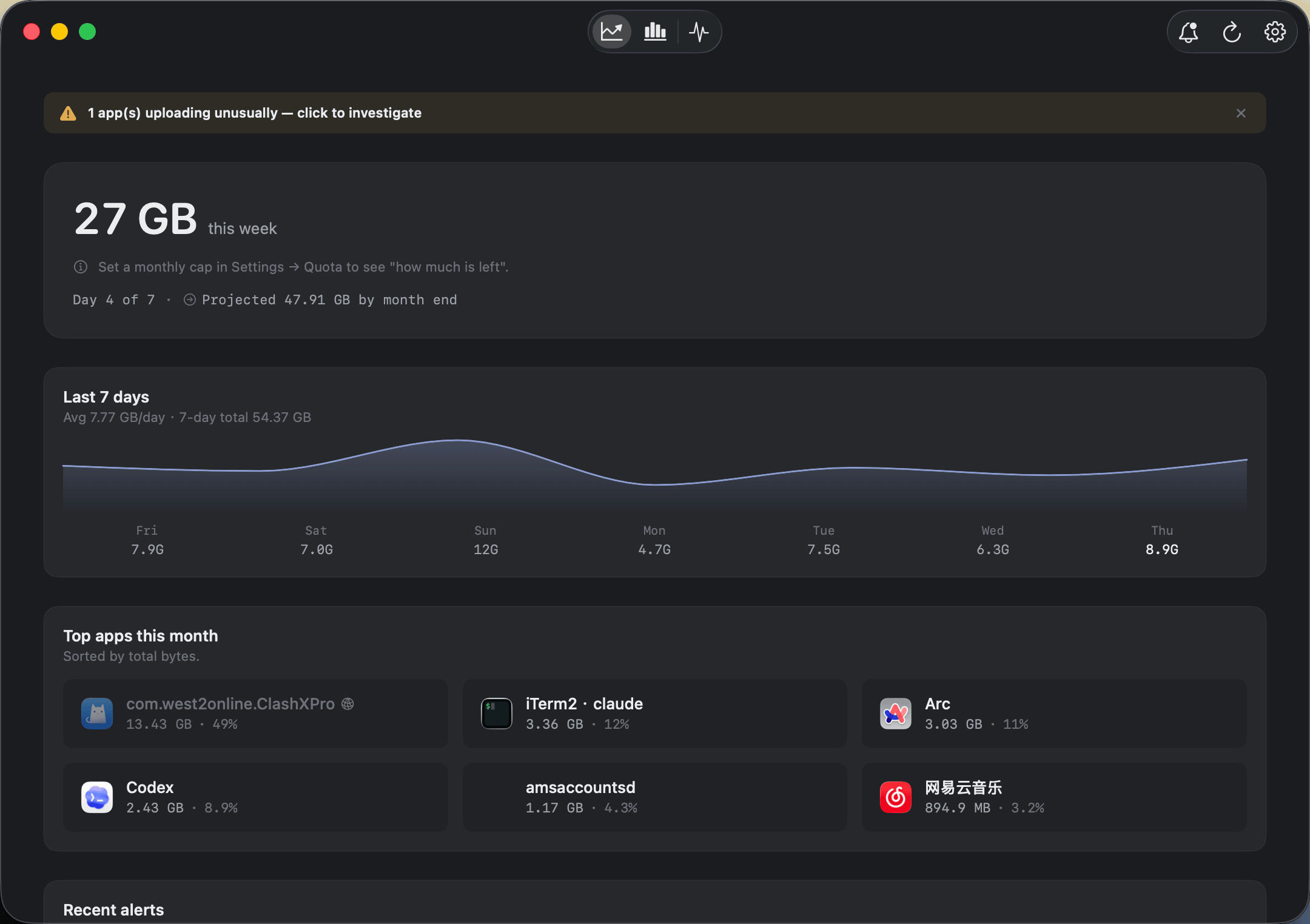
Not just how much — the overview shows this period's usage, the 7-day trend and exactly which apps used it.
Bytetally vs Bandwidth+ at a glance
| Capability | Bytetally | Bandwidth+ |
|---|---|---|
| Core model | Per-app accounting plus per-network budgets and control | Lightweight per-network totals counter |
| Per-network data totals | ✓ Filter and compare by Wi-Fi, independent cap per network | ✓ Its core feature |
| Per-app usage detail | ✓ Upload and download separated, live rate + period totals — even through VPNs or local proxies | — |
| Data caps with alerts | ✓ Monthly / weekly / daily, 80%·100%·custom thresholds | — |
| Unusual-upload alerts | ✓ Notifies when an app's upload surges | — |
| Block an app | ✓ One click | — |
| Throttle an app | ✓ Smooth upload/download speed limits | — |
| Per-app quota + overage auto-response | ✓ Auto-block or auto-throttle when a cap runs out | — |
| CSV / JSON export | ✓ Minute / hour / day / month granularity | — |
From "how much" to "which app"
A per-network counter can tell you that Tuesday cost you 6 GB. It cannot tell you that 5 of those gigabytes were one app quietly re-uploading a library in the background — which is the difference between shrugging and fixing the problem. Bytetally measures through a macOS Network Extension (App Store reviewed, fully sandboxed), so the attribution is honest even in awkward cases: traffic through VPNs or local proxies such as ClashX is traced back to the app that actually caused it, command-line tools are merged into their host app, and transfers between devices on your own network stay out of your internet totals.
The free tier already answers the "which app" question: live ↑↓ speed in the menu bar, a popover that ranks apps by usage this period, an overview with a 7-day trend and top apps, and a Live view of the last 10 minutes. From there, Pro turns the numbers into a budget you can enforce:
- Watch. Open the menu bar popover the moment the connection feels busy — the surprise data-eater is visible in seconds, upload and download separated.
- Budget. Set a monthly, weekly or daily cap, then give metered networks their own independent budget under Network & Quota. Bytetally notifies you at 80%, 100% or any threshold you choose, and warns when an app's upload suddenly surges.
- Act. Right-click any app: Disconnect, Limit speed or Set quota — or let the overage auto-response block or throttle automatically when a cap is used up. Need the numbers elsewhere? Export CSV or JSON at minute, hour, day or month granularity.
When Bandwidth+ is the better choice: if all you want is a light per-network tally in the menu bar — and you never need to know which app used the data, get warned before a cap, or slow anything down — Bandwidth+ does that job well, and Bytetally may simply be more tool than you need.
Bytetally earns its place the day a total stops being enough and you need the ledger underneath it.
Moving from Bandwidth+: a 5-minute setup
- Install Bytetally from the Mac App Store and approve the Network Extension when macOS asks.
- Recreate your per-network budgets: each Wi-Fi you join appears under Network & Quota, where it gets its own independent cap.
- Let Bytetally run for a day, then check the overview — the 7-day trend and top-apps list show where your totals were actually going.
- Turn on threshold alerts and the overage auto-response so the budget enforces itself even when you're not watching.
Frequently asked questions
Does Bytetally track usage per network like Bandwidth+?
Yes. Bytetally records which Wi-Fi network the traffic happened on, lets you filter and compare by network, and gives each network its own independent data cap — a strict weekly budget for your hotspot, unlimited at home.
Can Bytetally show which app used the data?
Yes — that is its core, free feature. Every app's upload and download are tracked separately, as a live rate and as totals for the period, and traffic that flows through a VPN or local proxy is traced back to the app that caused it.
Will Bytetally warn me before I use up my data plan?
Yes. Set a monthly, weekly or daily cap and Bytetally notifies you at 80%, 100% or any custom threshold. It also alerts when an app's upload suddenly surges, and the overage auto-response can block or throttle traffic once a cap is used up.
Is my traffic data uploaded anywhere?
No. All analysis happens on-device. There is no account, and the only network request the app makes is purchase-receipt validation.
Is Bytetally free?
Core monitoring is free. Pro features such as data caps, per-app control, full history and export come with a free trial, then a subscription or a one-time lifetime purchase.
Related pages
Your totals already told you something's up — find the app
Per-app tracking free forever. Per-network caps, alerts and export with a free trial.
Download Free on the Mac App StoremacOS 14 Sonoma or later · 100% on-device · No account